Instructli
TL;DR
Context
i. the problem
Computer organization is one of the more conceptually abstract courses in a CS curriculum, where students are asked to reason about processor datapaths, cache hierarchies, and instruction-level hazards without ever being able to see them happen. Textbook diagrams and static slides describe a pipeline in motion, but they can't show it moving.
Having both experienced this gap as students in the course, my collaborator and I joined the project when our professor began recruiting students to help build a solution. Our goal was straightforward: give students something they could actually manipulate, not just look at, so the concepts that only make sense in motion could finally be seen in motion.
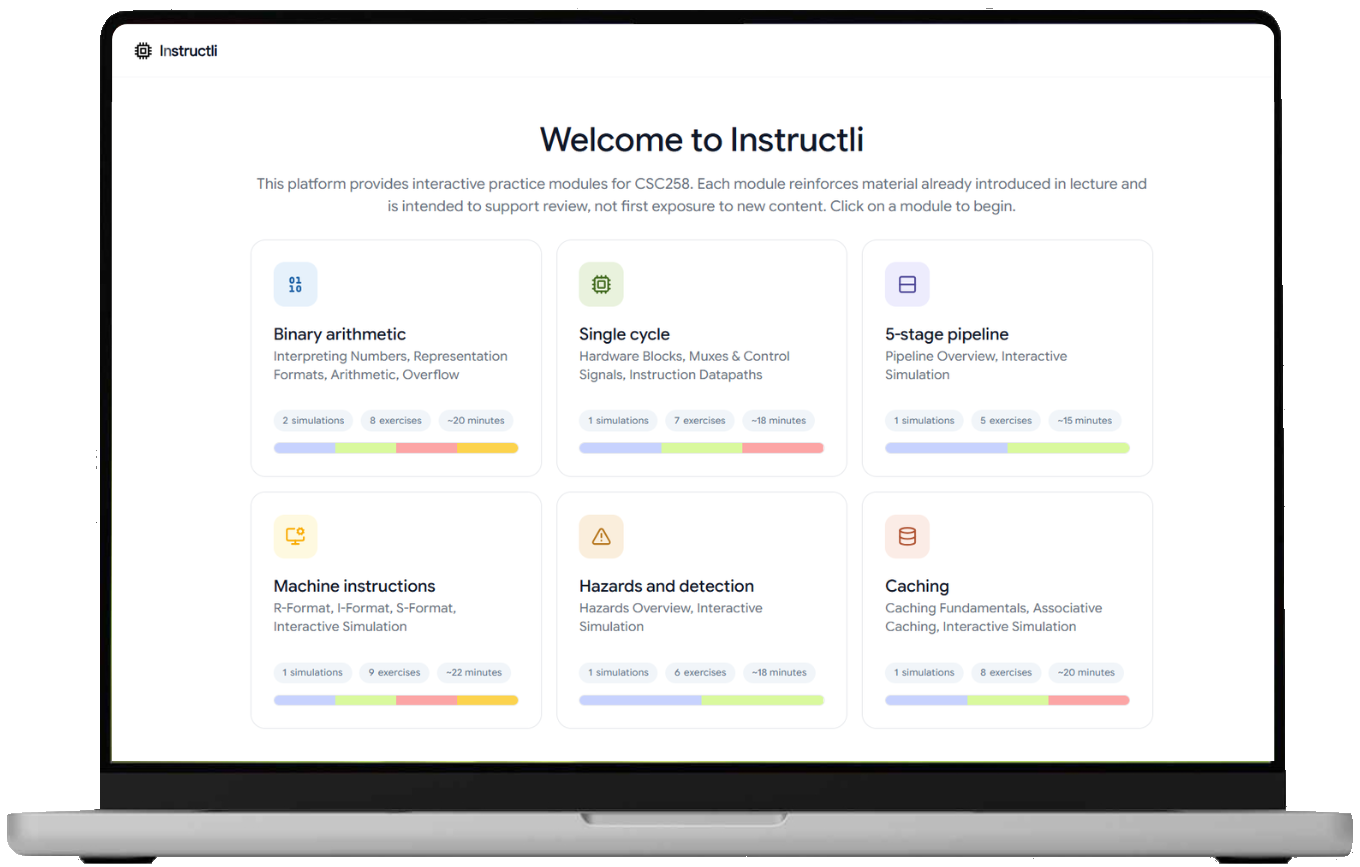
Instructli is a two-sided platform. To students, it's 6 interactive modules that replace static diagrams with things you can actually manipulate: step through a datapath instead of reading about it, trace a cache eviction yourself instead of being told how one works, predict a pipeline hazard instead of watching one get explained.
ii. the product
To the instructors running the course, it's a lighter piece of infrastructure sitting behind the scenes: control over what's live and in what order, and visibility into which of those six concepts is actually landing with the class, without waiting for exam results to find out.
That product pitch was easy to state in a sentence. Turning it into an actual scope, deciding which concepts deserved their own module, which could be merged into one, and which didn't make the cut at all, was where the real work started.
Planning +
Design
i. feature ideation
Our feature scope was constrained by a simple rule: every module had to represent a concept students consistently got wrong on past exams and assignments, not just a concept that was easy to visualize. That ruled out a few flashier ideas early (a full CPU "sandbox" mode, for instance) in favor of the six focused modules that maps directly to graded material. The following outlines our decisions in splitting up the course content into the various focused modules to ensure the best learning flow for students.
Alongside the student-facing modules, we scoped a second set of features for the admin side, whom would actually be running the course day to day. A professor teaching CSC258 needed a way to lock a module before it was ready, retire one mid-semester, or reorder the syllabus flow without waiting on a redeploy, and most importantly, see in aggregate which concepts students were still getting wrong. That became the admin dashboard: live module control and a stats view built on the same student activity data, so the instructor side of Instructli could evolve independently of the six modules themselves.
ii. the design system
Before development began, we mocked up prototypes of the modules in Figma to lock a shared visual language: consistent tags for module state, a color system for correct/incorrect feedback, and layout patterns that would hold up across six fairly different simulations. Working from a single Figma file also let us split development work in parallel without our two halves drifting apart, and gave our professor something concrete to react to early, so she could flag what she actually needed from the tool before a line of code was written.
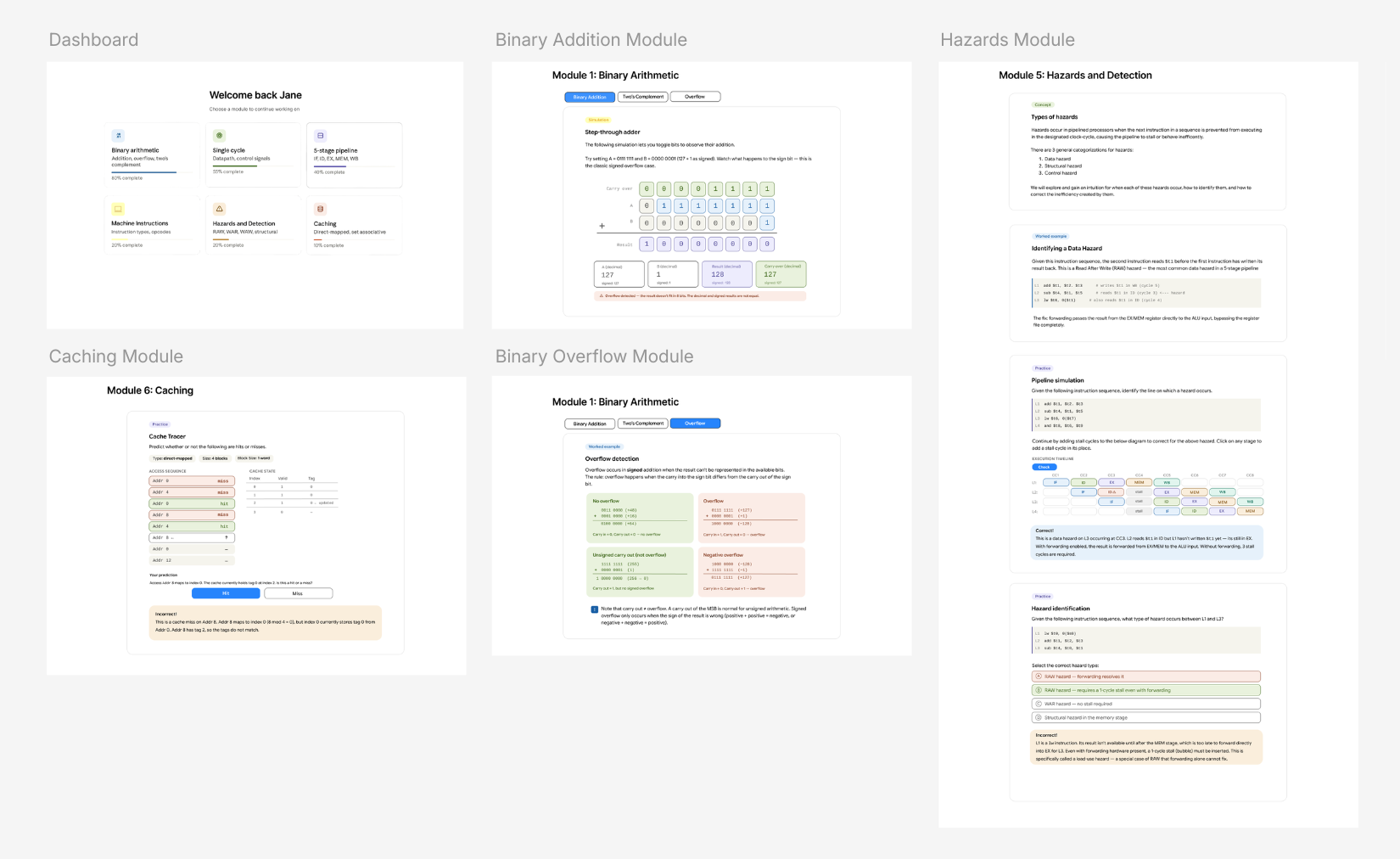
A few decisions changed between this pass and what shipped. Originally, certain button layouts in the were centered; we moved them to be right or left aligned after testing made the centered version feel jarring against how students actually scanned the panel. We also dropped progress bars from the module cards on the dashboard, since percentage-complete wasn't a metric we could measure meaningfully, and replaced them with a simple visual count of each module's content tabs instead, so students could gauge scope at a glance rather than a completion number that didn't mean anything.
feature 1 • configurable cache tracer
Cache behavior is usually taught through one worked example: a specific access pattern, walked through once. We built the caching module as a real simulator instead: students can configure it as direct-mapped, set-associative, or fully associative, and choose between LRU or random evictions. Every hit, miss, and eviction shown is computed live from actual address decomposition, not pulled from a pre-solved case. This meant students could test scenarios they were stuck on instead of hoping it matched the one example the textbook covered.
feature 2 • hazard trainer
Most hazard content is passive: a diagram shows a pipeline stalling, and the student is expected to internalize why. We flipped the interaction so students click directly on the pipeline grid to insert a stall bubble where they think one is needed, then check their answer against the correct timing. The trainer deliberately includes cases where forwarding alone resolves a dependency alongside load-use hazards where it can't, so students have to distinguish the two rather than assume every hazard needs a stall. Getting it wrong shows exactly where the timing broke, turning "I don't get hazards" into a specific, correctable mistake.
feature 3 • datapath tracer
Knowing what a processor does each cycle is different from knowing which parts of the datapath are active while it does it. In the tracer, students watch instructions move through the pipeline one cycle at a time and click every path segment carrying a signal in that cycle. Color-coded feedback shows what they got right, selected by mistake, or missed, so a wrong answer points to a specific misunderstanding. With several instructions in flight at once, students see pipelining happen instead of just reading about it, and can step through to find the exact cycle where something changed.
feature 4 • admin dashboard + live modules
Instructli needed to stay editable after launch (locking a module before it was ready, hiding one mid-semester, reordering the syllabus flow) without a redeploy every time. The admin dashboard supports drag-and-drop reordering, and one-click lock and visibility toggles, all writing to the same table the student-facing homepage reads from. That shared source of truth was a deliberate choice: an admin change takes effect for students immediately, with no separate "publish" step and no risk of the two views drifting out of sync.
feature 5 • live analytics dashboard
Once modules were live, the open question shifted from "does this work" to "is this actually helping students." The stats dashboard refreshes automatically every fifteen seconds and surfaces week-over-week change, not just totals, alongside a per-question difficulty rating pulled from real accuracy data. Instead of reading as a vanity metrics page, it's built to answer an instructor's actual question: which concepts are students still getting wrong, and is that getting better or worse over time.
Because Instructli needed to serve the full CSC258 cohort (and additionally scale to UofT's broader 80K+ student population), access couldn't rely on manual account creation. Integrating UofT's SSO meant students could log in with credentials they already had, removing friction that would otherwise stand between a student and actually using the tool during a study session.
ii. accessibility + authentication
Technical Design
i. implementation
Instructli is a full-stack Next.js (App Router) application with Supabase/Postgres handling application data, deployed under PM2 rather than a serverless platform, since the Shibboleth Service Provider that authenticates users has to run as a persistent reverse proxy in front of the app, not inside an ephemeral function.
The harder problem wasn't any one module — it was that six of them were being designed and built at once, each with its own logic for what counts as correct, without turning into six disconnected mini-apps that happen to share a homepage. Getting there meant settling on a common shape early: every module reports progress and results through the same interface, and the module list itself (what's visible, what's locked, what order things appear in) lives in one place both students and the admin dashboard read from. That shared shape is what let two people build six fairly different simulators without the seams showing.
Reliability mattered on both ends of that shared interface. On the write side, an analytics event retries automatically if it fails, so a student closing the tab mid-request doesn't silently drop their data. That matters because the stats dashboard is only as trustworthy as the events that actually make it there. On the read side, access is split deliberately: student-facing data stays open to read and log, while anything touching admin state, like locking a module or editing the roster, is gated behind a stricter check, with login attempts rate-limited so that the boundary can't be brute-forced. Neither piece is visible in the product itself, but both are the difference between a tool that works in a demo and one that holds up with 80,000 students able to reach it.
The pipeline module could have been built one of two ways: a small set of hand-crafted examples with detailed teaching annotations, or a general engine that computes behavior from whatever a student types in. We decided to build both.
ii. highlighted decisions
The guided walkthrough runs on hand-authored examples with stage-by-stage explanations written specifically to teach a first-time concept well. The practice quiz runs on a separate general engine that accepts any instruction sequence a student writes and works out the pipeline behavior for real, with no pre-written answer behind it. It was more work than choosing one approach and living with its weaknesses, but it meant the lesson could stay carefully explained without limiting what a student could actually test for themselves afterward.
The hardest problem wasn't any single simulator: it was making six independently complex systems (each with its own state machine, its own edge cases in malformed input) feel like one coherent product instead of six student projects stapled together. The pipeline engine alone runs over 2,000 lines of cycle-by-cycle logic; getting it to accept arbitrary instruction sequences meant hardening the RISC-V-style parser against inputs that don't map cleanly to a hazard case, rather than assuming students would only ever test "valid" sequences.
Challenges
The second challenge was authentication at a scale neither of us had built for before: 80,000+ potential users through Shibboleth SSO is a very different reliability bar than a class project, and it meant testing account-provisioning edge cases (first-time login, role assignment, admin whitelist behavior) well beyond the 100+ students actually live this semester.
Closing
Reflections
This was my first time taking a project all the way from idea to a live production deployment, where I wasn't just writing the code, but owning it: the architecture decisions, the auth integration, the schema design, and the responsibility that comes with a tool real students will actually use to study for their exams. Beyond the technical skills of full-stack development with Next.js and Supabase, SSO integration at scale, and PostgreSQL schema design and optimization, it taught me what it means to build something with reliability in mind from day one, not as an afterthought.
I'm excited to see Instructli in the hands of CSC258 students this upcoming year, and grateful to my collaborator Rhea Paste and supervisor Professor Engineer for the chance to build something that might make this course a little more approachable for the next cohort, at a scale well beyond anything either of us had built for before.