Claricode
TL;DR
Context
i. the problem
At EmberHacks 2025, we were asked to create an innovative solution to make learning fun, accessible, and engaging for all. My partner and I took the time to brainstorm real pain points that are occuring within the education industry, taking into consideration our own experiences. Through this we settled on building a solution for an issue we had both been facing throughout the semester:
As students ourselves, we experienced how this fragmentation made it difficult to revisit material effectively, especially when preparing for exams within tight deadlines, or trying to clarify gaps in understanding after lectures.
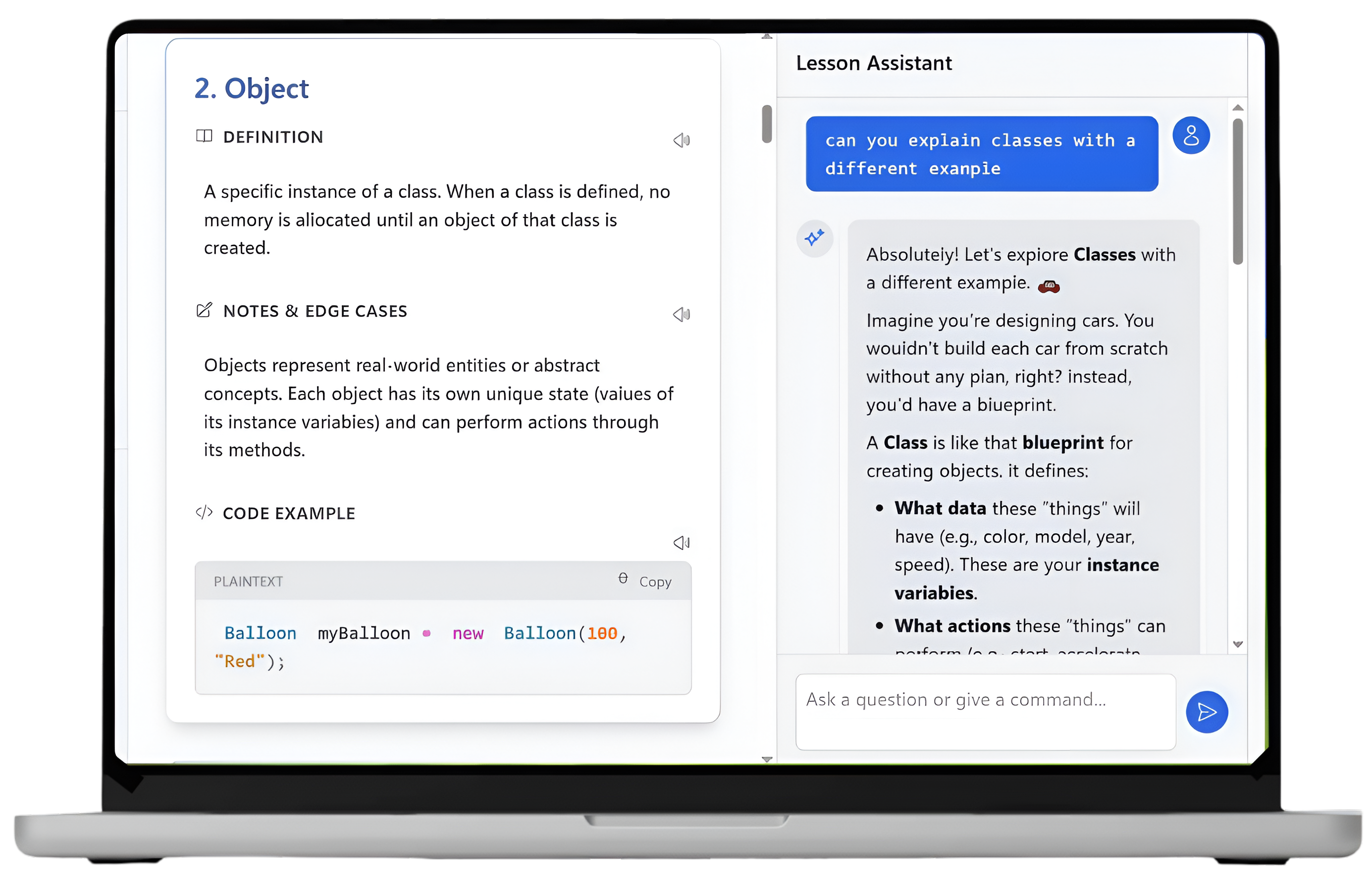
Claricode is an AI-powered web application that transforms unstructured lecture materials and code files into structured, editable lessons. Each lesson combines clear definitions, annotated code snippets, examples, and visual explanations, with an embedded AI assistant to support contextual questions as students learn. Rather than replacing lectures, Claricode is designed to complement existing coursework by organizing content into a format that supports deeper comprehension and efficient review.
ii. the product
After identifying fragmentation as the core issue in computer science lectures, we prioritized features that reduced context switching and supported active review rather than passive note storage. Design decisions were guided by how students actually move through lecture material—switching between concepts, examples, and explanations under time pressure. Early sketches and low-fidelity prototypes helped us test flows quickly, refine feature scope, and align on a simple, intuitive interface before moving into technical implementation.
Planning +
Design
i. feature ideation
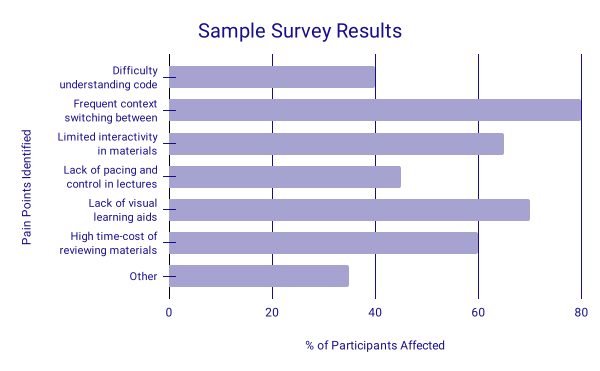
We conducted a sample survey through student participants to identify pain points in how
students currently study from code-heavy lectures. Our results showed strong patterns in
recurring challenges such as context switching, limited interactivity, and insufficient
visual support, highlighting gaps in how code-heavy material is currently delivered and reviewed.
From this, we prioritized features
that would reduce cognitive load, preserve context, and support different learning
styles, while remaining feasible within a 24-hour hackathon timeframe.
feature 1 • structured lessons
Students often rewrite lecture notes into structured summaries when studying. We mirrored this behavior by designing a consistent lesson format that includes definitions, examples, edge cases, and code snippets—all generated through the user inputted content from actual lectures. This structure helps students quickly identify key ideas, connect separated concepts, and reduces the effort required to reconstruct meaning from scattered materials.
feature 2 • embedded ai assistant
Instead of placing the chatbot in a separate interface, we embedded it directly alongside lesson content. This allowed students to ask questions without losing their place, keeping learning contextual and uninterrupted. The assistant adapts explanations to the lesson content, supporting both high-level understanding and specific code-related questions.
feature 3 • integrated note-taking
We included inline highlighting and note-taking to allow students to personalize generated lessons and actively engage with the material as it is presented. By embedding these interactions inline rather than in a separate workspace, we reduce context switching and support deeper cognitive processing during learning. This approach reinforces active learning and gives users greater control over how content evolves over time, transforming generated lessons into personalized study resources that reflect each student’s priorities and learning process.
feature 4 • text-to-speech
Text-to-speech was incorporated to make generated lessons more accessible and adaptable to different learning contexts. By allowing students to listen to lesson content rather than relying solely on reading, this feature supports learners who benefit from auditory reinforcement as well as those studying in hands-free or low-attention environments. During planning, we focused on keeping the interaction lightweight and non-disruptive, ensuring that audio playback could be started, paused, or revisited without breaking the learning flow. By integrating audio directly into the lesson experience, we aimed to support diverse learning preferences while maintaining a cohesive and focused study workflow.
feature 5 • pdf export support
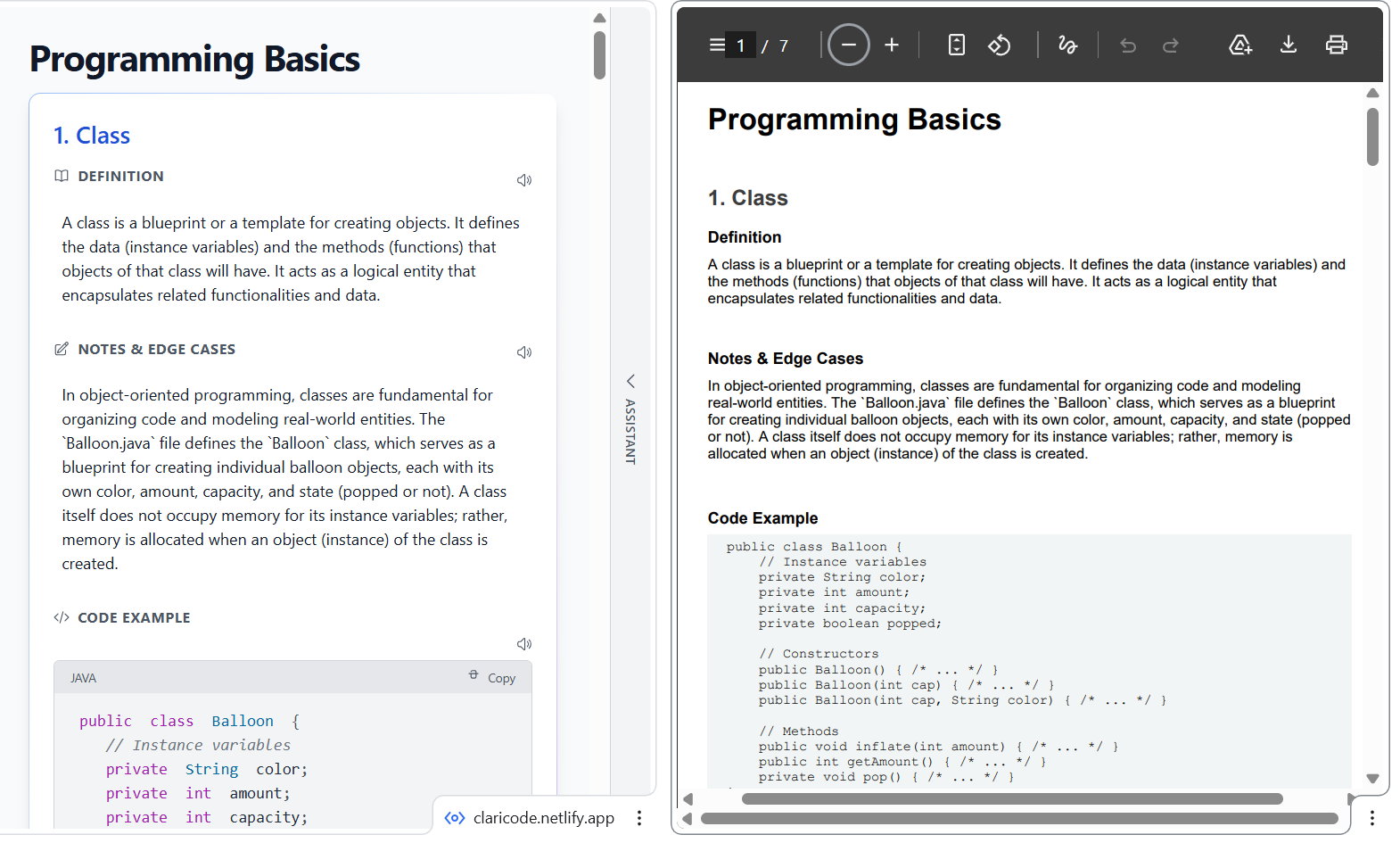
As students interact with lessons through highlighting, annotations, and notes, exporting this content as a consolidated PDF allows them to preserve their personalized material in a portable, offline-friendly format. During planning, we focused on ensuring that exported documents reflected the structure and emphasis created during study, maintaining visual hierarchy so that highlighted concepts and annotations remained meaningful outside the app. By enabling PDF export, we ensured that learning artifacts remained useful across contexts, reinforcing continuity and long-term retention.
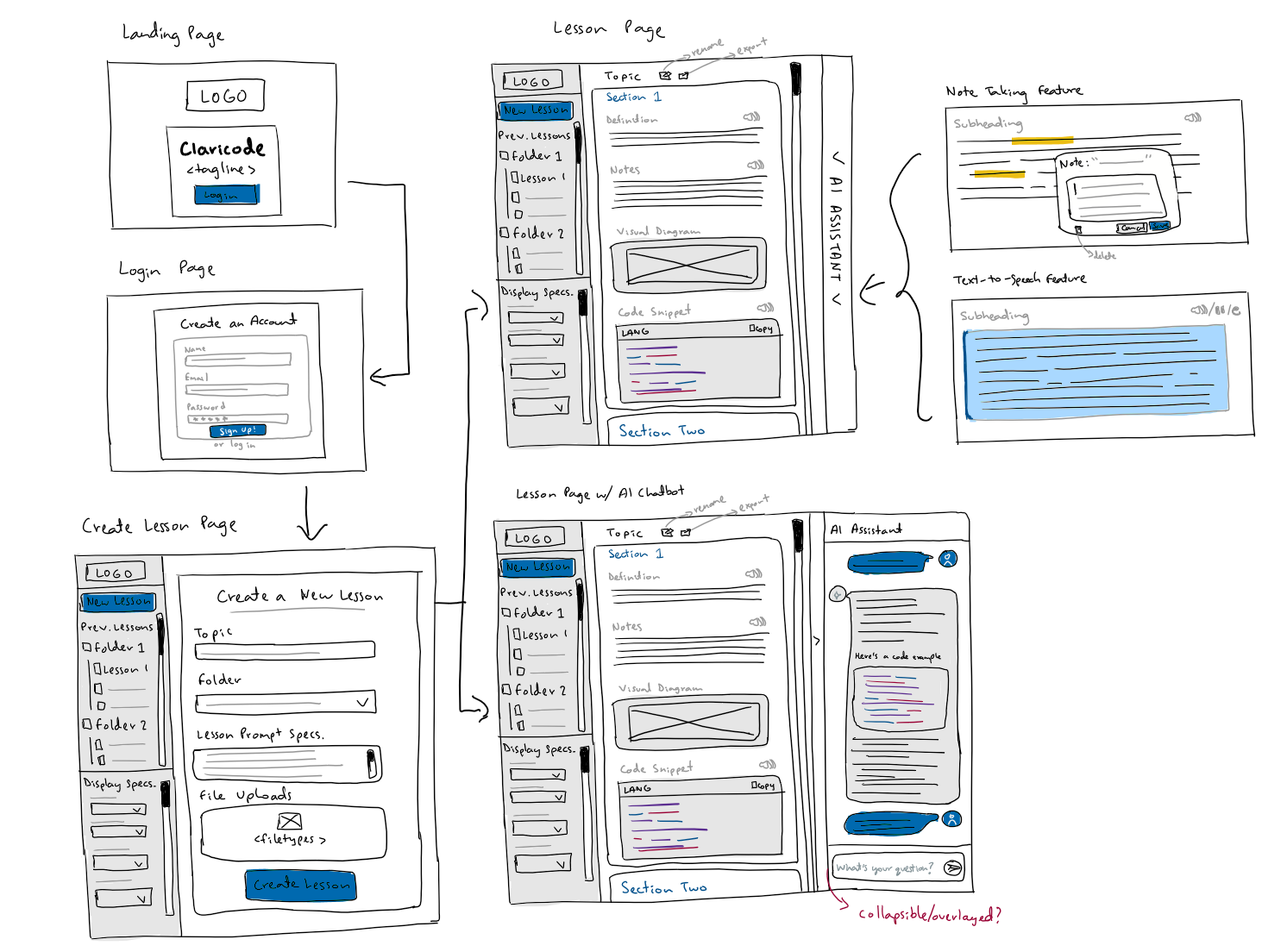
Our UI design focused on clarity and minimal friction. We prioritized a side-by-side layout that keeps lesson content and the AI assistant visible at all times, reducing context switching. Low-fidelity wireframes helped us validate layout and information hierarchy early, after which we refined spacing, typography, and visual hierarchy directly through test prototypes and code.
Technical Design
i. implementation
Claricode was built using React and TypeScript, with Vite enabling fast iteration and Tailwind CSS ensuring consistent, reusable styling across the interface. Lesson generation and the contextual AI assistant were powered by the Google Gemini API, with responses structured to support inline highlighting and note persistence. Client-side state was managed to keep interactions responsive while minimizing unnecessary re-renders during editing workflows. For portability, jsPDF was used to export personalized lessons into structured, readable documents. The overall architecture was intentionally lightweight to balance performance and flexibility within hackathon constraints.
ii. highlighted decisions
Design–development iteration
Many UI decisions were refined directly in code to validate responsiveness, accessibility, and real interaction states.
Component-based structure
Lessons and chatbot interactions were built as reusable components to keep the codebase maintainable as features evolved.
Client-side PDF generation
Client-side exports were chosen to avoid backend complexity while still delivering meaningful user value.
One major challenge was balancing feature scope with time constraints. With only 24 hours, we had to prioritize core learning flows over long-term scalability. Another challenge was designing AI outputs that felt structured and reliable. Prompt iteration and testing were essential to ensure the lesson content remained clear and pedagogically useful.
Challenges
Reflection +
Next Steps
Claricode reinforced the importance of designing AI-driven tools around real user workflows rather than novelty. Tight collaboration between design and development allowed us to move quickly while maintaining coherence across the product. With more time, we would focus on richer diagram generation, persistent user accounts for saved lessons, structured usability testing with students, and expanded multilingual text-to-speech support to further improve accessibility and learning outcomes.